
Incredibox Features: Complete Guide to Music, Mixing, Versions and Gameplay
Explore Incredibox features, including drag-and-drop music creation, animated beatboxers, versions, recording, sharing, MP3 export, and gameplay.
Blog
Learn whether Incredibox works offline, what features need internet, how offline play works on Android, PC, iOS, kids’ devices, and APK setup.
Incredibox offline use is important for users who want to create music without depending on a constant internet connection. Since Incredibox is a music creation app based on animated beatboxers, sound icons, beats, effects, melodies, voices, and recorded mixes, many users want to know whether the app can work while traveling, studying, teaching, or using a device with limited connectivity.
The simple answer is that core music creation may work offline depending on the installed version, platform, and setup. Users may be able to open the app, choose available versions, drag sound icons, create mixes, and replay saved content without internet. However, some features may still require an internet connection, such as downloading the app, updating it, sharing mixes, accessing online features, syncing, or getting new content.
For the main Android package and download overview, visit the Incredibox APK page.
This guide explains how Incredibox offline mode works, which features may work without internet, which features usually need internet, and how offline use differs on Android, PC, iPhone, iPad, and kids’ devices.
Incredibox offline means using the app without an active internet connection after it has already been installed and set up.
Offline use usually means the user can open the app and create music locally on the device. The app may already contain the needed sounds, characters, animations, and versions required for basic music creation.
Offline use does not always mean every feature will work. Some features depend on internet access because they involve online sharing, updates, downloads, or community features.
Yes, Incredibox may be playable without internet for core music creation depending on the version and platform.
A user may be able to:
However, internet may still be needed for actions outside the local music creation experience.
| Feature | Offline Availability |
|---|---|
| Opening the app | May work offline after installation |
| Creating music | May work offline |
| Drag-and-drop mixing | Usually local once app is installed |
| Using available versions | May work if versions are already included |
| Recording mixes | May work depending on version and device |
| Replaying saved mixes | May work if saved locally |
| Downloading the app | Requires internet |
| Installing updates | Requires internet |
| Sharing mixes | Usually requires internet |
| Online community features | Requires internet |
| Downloading new content | Requires internet |
| Accessing some mods | May require internet depending on setup |
Offline use matters because Incredibox is often used in places where internet may not be stable.
Users may want offline access during:
Because Incredibox is a creative app, users may not want internet interruptions while building a mix.
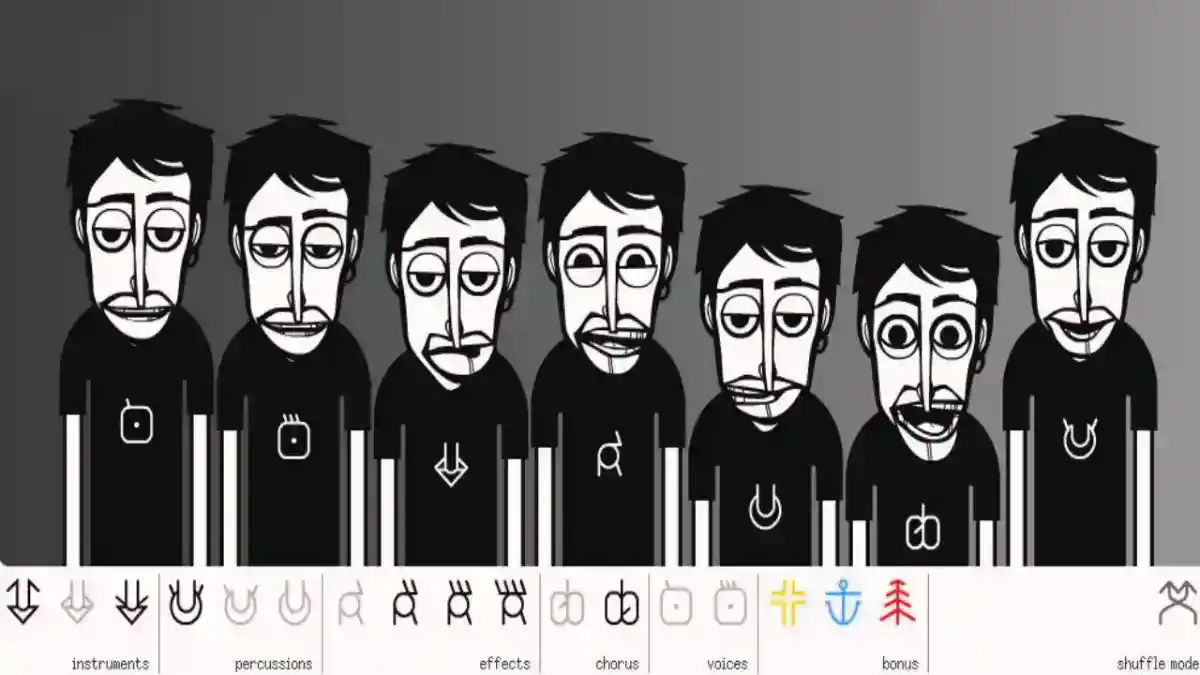
The main Incredibox experience is music creation. Users choose a version, drag sound icons onto animated characters, and create a beatbox-style mix.
This type of interaction can work offline when the required app content is already available on the device.
Offline music creation is useful because users can focus on sound combinations without waiting for online loading. It also makes the app more practical for kids, students, and casual users.
New users can learn the basic gameplay from the how to play Incredibox guide.
Incredibox mixes are built from sound categories. These usually include beats, effects, melodies, and voices.
When these sounds are already included in the installed app, users may be able to use them offline.
The app does not need to stream every sound from the internet during normal local play if the content is available inside the installed version.
This makes offline mixing possible in many situations.
Incredibox versions are different music styles inside the app. Each version includes its own sound library, visuals, character designs, and musical mood.
Offline access to versions depends on whether those versions are already available inside the installed app.
If a version is included and loaded locally, users may be able to play it offline. If a version needs to be downloaded, unlocked, updated, or accessed online, internet may be required.
For a full breakdown of official styles, read the Incredibox versions guide.
Recording may work offline if the app version supports local recording and the device has enough storage.
A recorded mix is usually created from the sounds active inside the app. If the recording process is local, internet may not be required.
However, sharing or exporting the recording may require internet depending on platform and feature availability.
For recording, saved mixes, Mixlist, and export details, read the Incredibox Mixlist and MP3 export guide.
The Mixlist may be available offline when saved mixes are stored locally on the device.
This means users may be able to open saved tracks and replay them without an internet connection.
Offline Mixlist access is useful because users can listen to their saved creations anywhere.
However, if a saved mix depends on online syncing, sharing, or cloud-based access, internet may be required.
Some Incredibox features may need internet even if basic music creation works offline.
Internet may be required for:
Users should separate core offline play from online-connected features.
Before Incredibox can be used offline, the app must be downloaded and installed.
Downloading the APK file or app package requires internet access. After installation, offline use may become possible depending on the version and setup.
Users who still need installation help should read the Incredibox APK installation guide.
App updates require internet because the newer package or app data must be downloaded.
Updates can improve compatibility, fix bugs, improve performance, or change feature support.
Manual APK users should update carefully because installing the wrong package can cause conflicts.
For update steps, read the Incredibox APK update guide.
Sharing usually requires internet because the app must send or publish the mix through an online service, link, or connected platform.
A user may be able to create and save a mix offline, but sharing it may not work until the device reconnects to the internet.
Parents should pay attention to sharing settings when children use the app.
Android users may be able to use Incredibox offline after installing the APK or app package. Once the app is installed and the needed content is available, users may be able to create mixes without Wi-Fi or mobile data.
Android offline use is useful for phones and tablets.
Offline Android users should check:
For Android-specific details, read the Incredibox for Android guide.
Android tablets can be especially useful for offline Incredibox sessions because they provide a larger screen and are often used by kids or students.
A tablet can be prepared in advance by installing the app, checking audio, testing versions, and confirming that mixes can be created without internet.
This is useful for classrooms, travel, and supervised screen time.
PC users may use Incredibox through an Android emulator or another compatible setup.
Offline use on PC depends on the emulator, installed app package, and whether the required content is already available.
If the emulator and app open correctly without internet, users may be able to create mixes offline.
However, emulator setup, app download, APK installation, updates, and online sharing may require internet.
For PC setup, read the Incredibox for PC guide.
iPhone and iPad users may be able to use Incredibox offline when the app is installed and supported content is available locally.
The iPad can be a strong offline device because the larger screen makes sound icons, characters, and animations easier to use.
iOS users should remember that APK files do not install directly on iPhone or iPad. APK is an Android package format.
For Apple device usage, read the Incredibox for iOS guide.
Offline mode can be useful for kids because it limits distractions and reduces dependence on online features.
Parents may prefer offline use because children can focus on music creation instead of online sharing or browsing.
Offline Incredibox sessions can be used for:
For parent guidance, read the Incredibox for kids guide.
APK safety still matters even when users plan to use Incredibox offline. An unsafe APK file can create problems before the app is ever used offline.
Users should review file source, permissions, compatibility, and package behavior before installation.
After installing an APK, users can disable unknown app installation permission to reduce future risk.
For more details, read the Incredibox APK safety guide.
Incredibox mods may or may not work offline depending on how they are accessed and installed.
Some mod content may be available locally after setup. Other mod content may require internet for download, updates, import, or community access.
Users should not assume every mod works offline.
For mod-related details, read the Incredibox mods guide.
The best way to use Incredibox offline is to prepare the app before disconnecting from the internet.
A good preparation process includes:
This helps users avoid problems later.
Install the app while online.
Open the app once after installation.
Check that versions load.
Test sound playback.
Create a short mix.
Test recording if needed.
Open saved mixes if available.
Make sure storage is available.
Update the app before travel if needed.
Disconnect internet and test offline use.
To test offline mode, turn off Wi-Fi and mobile data after the app is installed.
Then open Incredibox and check whether the app loads, versions appear, sound icons work, characters animate, and mixes can be created.
Users should also test recording and saved mixes if those features are important.
If something fails offline, it may depend on internet access, app version, or platform setup.
Incredibox may fail offline for several reasons.
Common reasons include:
Most offline problems can be avoided by testing the app before relying on offline use.
If Incredibox opens offline but no sound plays, the issue may not be internet-related.
Check:
No sound problems are often caused by device audio settings rather than offline mode.
If the app does not open offline, it may need online verification, missing content, or an update. It may also have failed to install correctly.
Users should reconnect to the internet, open the app once, check updates, and test again.
If the problem continues, use the Incredibox not working guide.
If a mix does not save offline, the issue may be storage, permissions, app version, or platform limitations.
Users should check available storage and make sure the app has permission to save data.
If saving works online but not offline, the feature may depend on an online service or syncing system.
Storage is important for offline use. The app needs space for installation, saved data, recordings, and local files.
Low storage can cause crashes, recording problems, missing saves, or loading errors.
Before using Incredibox offline, users should keep enough free space available.
Offline music creation can still use battery because the app runs animations, audio playback, and recording features.
Users who plan to use Incredibox during travel should charge the device before long sessions.
Battery-saving mode may affect performance on some devices.
Offline play can reduce mobile data usage because users do not need constant internet for local music creation.
This is useful for users with limited data plans.
However, downloads, updates, sharing, and online features will still use data when internet is enabled.
For travel, users should prepare the app before leaving.
A good travel setup includes:
This helps prevent offline problems.
For school or classroom use, teachers should test the app on each device before the activity.
A good classroom setup includes:
This keeps the activity focused and easier to manage.
Offline use is best for private music creation, travel, kids, and distraction-free sessions.
Online use is better for downloading, updating, sharing, community access, and features that require connection.
| Mode | Best For | Limitations |
|---|---|---|
| Offline | Creating mixes, travel, kids, classrooms | Sharing and updates may not work |
| Online | Downloads, updates, sharing, community access | Requires internet connection |
Both modes are useful depending on the user’s goal.
Yes, core music creation may work offline depending on the installed version, platform, and setup.
You may be able to create mixes offline if the app and required sound content are already installed on the device.
Recording may work offline when the app version supports local recording and the device has enough storage.
Sharing usually requires internet because the mix must be sent, uploaded, or accessed through an online feature.
Available versions may work offline if they are already included or loaded in the app.
Internet is needed to download the APK file, but the installed app may support offline use depending on version and setup.
Yes, offline use can be good for kids because it reduces online distractions and focuses on music creation.
Some mods may work offline after setup, but others may require internet for access, download, or updates.
The app may need missing content, an update, online verification, or a proper installation. Reconnect to internet and test the app again.
The issue may be low storage, missing permissions, app limitations, or a feature that depends on online syncing.
Incredibox offline use can be helpful for users who want to create music without constant internet access. Core music creation may work offline when the app is already installed and the required versions, sounds, and data are available on the device.
Offline mode is useful for Android phones, tablets, iPads, PC setups, kids, classrooms, travel, and low-data situations. Users may be able to create mixes, use sound icons, listen to animations, record tracks, and replay saved mixes without internet.
However, downloads, updates, sharing, online features, community content, and some mods may still require internet. The best approach is to install and test Incredibox before going offline, keep enough storage available, check audio settings, and confirm that the needed features work without a connection.
Explore Incredibox features, including drag-and-drop music creation, animated beatboxers, versions, recording, sharing, MP3 export, and gameplay.
Learn how Incredibox works on Android phones and tablets, including APK setup, compatibility, features, gameplay, storage, updates, and fixes.
Learn how to use Incredibox on PC with Android emulator setup, controls, compatibility, performance tips, APK installation, and common fixes.