
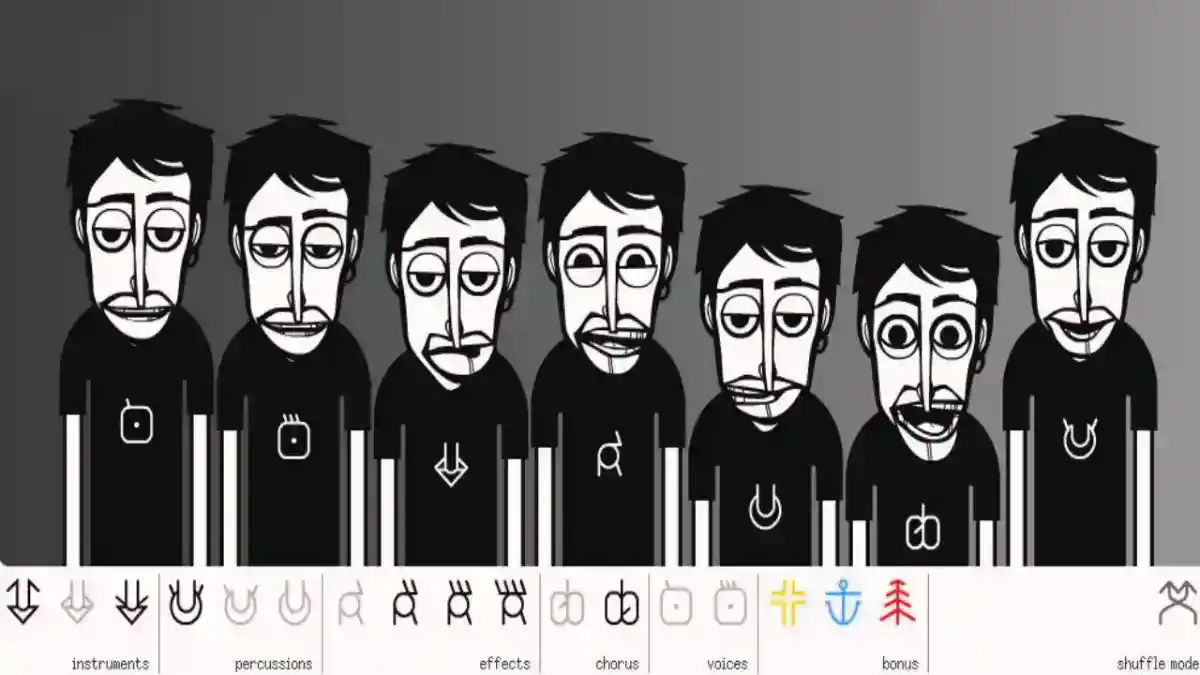
Incredibox Features: Complete Guide to Music, Mixing, Versions and Gameplay
Explore Incredibox features, including drag-and-drop music creation, animated beatboxers, versions, recording, sharing, MP3 export, and gameplay.
Blog
Learn how to play Incredibox, create music mixes, use beats, effects, melodies, voices, unlock bonuses, record tracks, and improve your sound.
Incredibox is a creative music game where users build beatbox-style songs by dragging sound icons onto animated characters. Each character performs a different sound, and the full group creates a music mix together.
The app is easy to understand because it does not require instruments, music theory, studio software, or professional editing skills. Users only need to choose a version, add sound icons, listen to the result, adjust the mix, unlock bonuses, record the track, and save or share the final creation.
For users who need the main app overview and Android package details, the central Incredibox APK page explains the download, features, compatibility, and basic app information.
This guide explains how to play Incredibox step by step, how sound categories work, how to create better mixes, and how beginners can understand the gameplay quickly.
The goal of Incredibox is to create a complete music mix by combining different sound layers. These sound layers usually include beats, effects, melodies, and voices.
Unlike many games, Incredibox does not focus on winning or losing. The goal is creativity. Users experiment with sounds until they create a mix that feels good.
A successful mix usually has:
The app rewards experimentation because different sound combinations can unlock animated bonuses.
The basic Incredibox gameplay flow is simple:
This simple structure makes Incredibox easy for beginners, kids, students, and casual music fans.
Open the app.
Choose a music version.
Drag sound icons onto characters.
Listen to each sound layer.
Combine beats, effects, melodies, and voices.
Adjust the mix.
Unlock bonus animations.
Record the final mix.
Save or share the result.
| Gameplay Element | Purpose |
|---|---|
| Music Version | Sets the sound style and visual theme |
| Sound Icons | Represent beats, effects, melodies, and voices |
| Animated Characters | Perform the sounds selected by the user |
| Beats | Create the rhythm foundation |
| Effects | Add texture and movement |
| Melodies | Create the musical identity |
| Voices | Add vocal expression and hooks |
| Bonuses | Reward strong sound combinations |
| Recording | Saves the final mix |
| Sharing | Lets users send mixes to others |
The first step in Incredibox is choosing a music version. Each version has a different style, sound library, character design, color theme, and mood.
One version may sound energetic, another may feel relaxed, another may focus on electronic sounds, and another may use more vocal rhythm.
Choosing the right version matters because it controls the type of music you can create.
Beginners should start with one version and explore all available sounds before switching to another. This helps users understand how sound icons work inside one musical style.
A full explanation of the available styles is covered in the Incredibox versions guide.
Sound icons are the main controls in Incredibox. Each icon represents a sound. When you drag an icon onto a character, that character starts performing the sound.
Most sound icons belong to one of four groups:
Understanding these groups helps users create better mixes.
Instead of adding random icons, beginners should learn what each sound type does inside the track.
A good mix usually starts with a beat. Beats create rhythm and timing. They act as the foundation for the rest of the music.
When you add a beat first, it becomes easier to understand where the other sounds should fit.
Beginners should try adding one beat, then listen for a few seconds before adding anything else. This helps the ear understand the rhythm.
After the first beat feels stable, another beat or rhythm layer can be added if the mix needs more energy.
Effects add texture to the mix. They can make the track feel more interesting, modern, atmospheric, or playful.
Effects are not always the main part of the song, but they support the overall sound.
Beginners should use effects carefully. Too many effects can make the mix feel crowded. A few well-selected effects usually work better than adding every sound at once.
Melody gives the mix its musical identity. While beats create rhythm, melodies often create the feeling or mood of the track.
A melody can make the mix sound happy, dark, calm, futuristic, or energetic depending on the selected version.
Beginners should add melody after the beat and effects are already working. This makes it easier to hear how the melody fits into the rhythm.
Voice sounds are an important part of Incredibox because the app is based on beatbox-style music. Voice sounds may include singing, vocal phrases, chants, harmonies, or vocal rhythm.
Adding voices can make the mix feel more human and complete.
Voices often work best when they are added after the rhythm and melody are already clear. This helps the vocal sound sit naturally inside the mix.
A good Incredibox mix is not only about adding sounds. It is also about balance.
If too many similar sounds are active, the mix may feel crowded. If there are too few sounds, the mix may feel empty.
To balance the mix, users should listen carefully and ask:
Removing a sound can sometimes improve the mix more than adding a new one.
Incredibox encourages experimentation. Different icon combinations can create different moods and may unlock animated bonuses.
Beginners should try multiple combinations instead of keeping the first mix they create.
A useful method is to change one sound at a time. This helps users understand what each icon contributes to the track.
For example, keep the beat the same and change the melody. Then keep the melody and change the voice. This makes it easier to learn how the sound system works.
Animated bonuses are special visual rewards that appear when users discover certain sound combinations.
These bonuses make the gameplay more exciting because they encourage users to explore the sound library.
To find bonuses, users should test different icon groups and listen for combinations that feel connected.
Bonuses are not required to enjoy the app, but they add discovery and replay value.
After creating a mix you like, you can record it. Recording saves the performance so it can be replayed later.
This is useful because some combinations are hard to recreate exactly. Recording helps preserve the final track.
Before recording, listen to the mix carefully. Make sure the rhythm, melody, voices, and effects work well together.
For more details about saved tracks and exports, read the Incredibox Mixlist and MP3 export guide.
Saved mixes allow users to keep their favorite creations. Over time, users may create many tracks, so managing saved mixes becomes important.
A saved mix can be used for listening, sharing, comparing, or improving future music ideas.
Beginners should save their best mixes instead of saving every experiment. This keeps the mix list cleaner and easier to manage.
The best beginner strategy is to build slowly.
Start with one beat. Add one effect. Add one melody. Add one voice. Listen to the result. Then adjust.
Many beginners add too many sounds too quickly. This can make the mix confusing.
A better approach is:
This method helps users create cleaner mixes.
Build the rhythm first.
Add atmosphere.
Add melody.
Add voice.
Remove weak sounds.
Record only the best version.
A good Incredibox mix usually has structure. It should not feel random.
A strong mix often includes:
The best mixes usually come from listening carefully rather than adding every available sound.
Beginners often make a few common mistakes when playing Incredibox.
The first mistake is adding too many sounds at once. This makes it difficult to hear individual layers.
The second mistake is ignoring the beat. Without a clear rhythm, the mix may feel weak.
The third mistake is using voices too early. Voices work better when the rhythm and melody already support them.
The fourth mistake is not recording good mixes. A strong mix may be difficult to rebuild later.
The fifth mistake is not exploring different versions. Each version teaches a different style of sound combination.
Beats are the rhythm section. They create the pulse of the mix and help the other sounds stay organized.
A beat can be simple or energetic depending on the version. Some beats are soft and minimal, while others are stronger and more active.
Beginners should treat beats as the foundation of the mix.
Effects add color and movement. They can make a mix sound more polished or more experimental.
Effects are useful for filling space between beats, melodies, and voices.
However, effects should not overpower the main rhythm or melody.
Melodies are often the most memorable part of a mix. They help create emotion and identity.
A melody can change the mood of the entire track.
When choosing a melody, users should listen carefully to how it connects with the beat.
Voices add personality. They can make the mix feel more alive and expressive.
Voice sounds may act like hooks, harmonies, chants, or rhythmic vocal layers.
Good voice placement can make a mix feel complete.
Playing Incredibox on Android is simple because the app works well with touchscreen controls.
Users can drag sound icons with their fingers and place them directly on characters.
Android phones are good for quick sessions, while Android tablets provide a larger and more comfortable screen.
For Android-specific details, read the Incredibox for Android guide.
On PC, users usually need an Android emulator if they are using an APK file. The mouse replaces touchscreen controls.
Users can click, drag, and drop sound icons onto characters inside the emulator.
PC can be useful for a larger screen, better speakers, and longer sessions.
For desktop setup, see the Incredibox for PC guide.
Incredibox can work well on iPhone and iPad when a compatible iOS version is available.
iPhone is good for quick music creation, while iPad is better for larger visuals and longer sessions.
APK files do not install directly on iOS because APK is an Android package format.
For Apple device details, read the Incredibox for iOS guide.
Yes, Incredibox is easy for kids because the app uses visual controls instead of complex music tools.
Kids can learn rhythm, sound layering, listening, and creativity by experimenting with sound icons.
Parents should still review sharing settings and online access.
A full parent-focused explanation is available in the Incredibox for kids guide.
Core music creation may work offline depending on the app version and setup. This is useful for travel, classrooms, and users with unstable internet.
However, sharing, updates, downloads, and online features may require internet access.
For complete details, read the Incredibox offline guide.
If Incredibox stops working during gameplay, the issue may be related to storage, sound settings, app version, device compatibility, or installation problems.
Common problems include:
The full fixing process is explained in the Incredibox not working guide.
Once users understand the basics, they can improve their mixes with better listening habits.
Try starting with different beat combinations. Then test how each melody changes the mood. After that, add voices slowly.
Another useful technique is removing sounds during playback. This helps users hear which sounds are essential and which ones are unnecessary.
A strong mix is often created by choosing the right sounds, not by using every sound.
The best way to practice is to focus on one version at a time. Explore every sound inside that version before moving to another.
Create three different mixes from the same version:
This helps users understand how flexible each version can be.
After that, compare the mixes and choose the strongest one to record.
A simple mix
A rhythm-heavy mix
A melody-focused mix
You play Incredibox by choosing a version, dragging sound icons onto animated characters, combining beats, effects, melodies, and voices, then recording the final mix.
No. Incredibox is beginner-friendly because it uses visual controls and automatic timing.
No. You do not need music theory, instruments, or editing skills to create a mix.
It is usually best to start with a beat because the beat creates the rhythm foundation.
Bonuses are animated rewards unlocked by discovering specific sound combinations.
Yes. Users can record mixes and save them for later listening.
Yes. Sharing may be available depending on the app version, device, and internet access.
Yes. Incredibox is one of the easiest music creation apps for beginners because it uses drag-and-drop controls.
Yes. Kids can use Incredibox because it is visual and simple, but parents should review sharing and online settings.
Core gameplay may work offline depending on the version, but sharing and updates may require internet.
Learning how to play Incredibox is simple because the app is built around visual music creation. Users choose a version, drag sound icons onto animated beatboxers, combine beats, effects, melodies, and voices, unlock bonuses, record mixes, and save or share their music.
The best way to create a good mix is to build slowly. Start with a beat, add effects, choose a melody, place voices carefully, and listen before recording.
Incredibox works well for beginners, kids, students, casual users, and music fans because it makes music creation easy, playful, and creative.
Explore Incredibox features, including drag-and-drop music creation, animated beatboxers, versions, recording, sharing, MP3 export, and gameplay.
Learn how Incredibox works on Android phones and tablets, including APK setup, compatibility, features, gameplay, storage, updates, and fixes.
Learn how to use Incredibox on PC with Android emulator setup, controls, compatibility, performance tips, APK installation, and common fixes.