
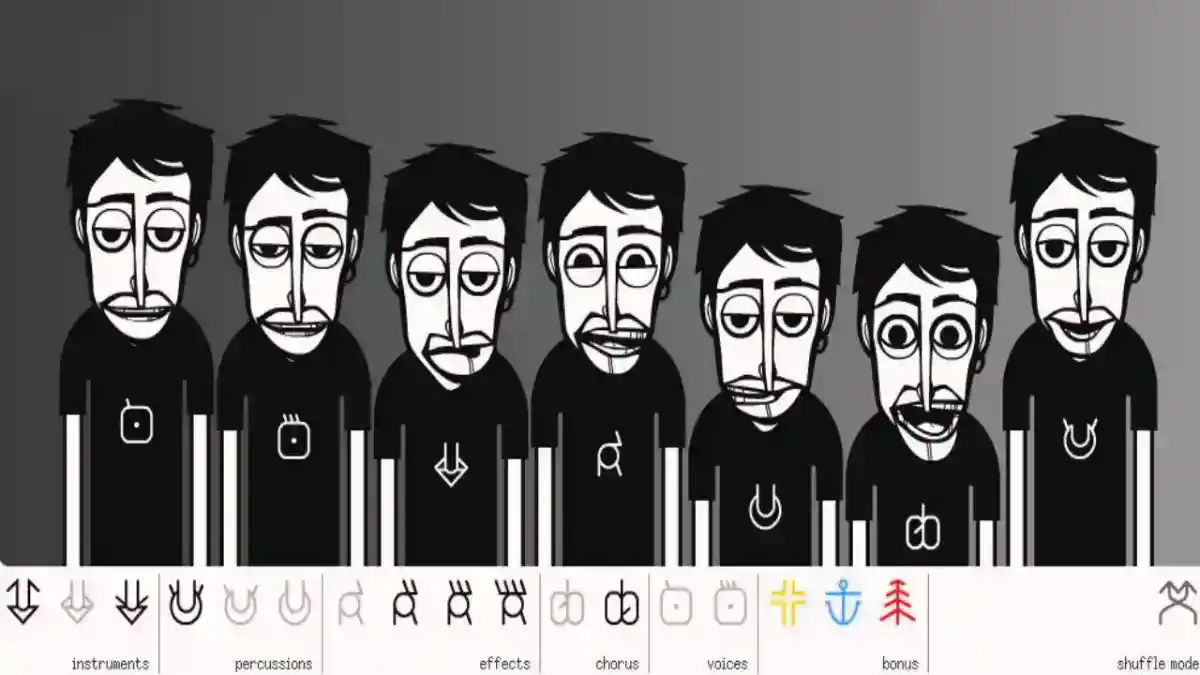
Incredibox Features: Complete Guide to Music, Mixing, Versions and Gameplay
Explore Incredibox features, including drag-and-drop music creation, animated beatboxers, versions, recording, sharing, MP3 export, and gameplay.
Blog
Learn how Incredibox works on Android phones and tablets, including APK setup, compatibility, features, gameplay, storage, updates, and fixes.
Incredibox for Android is made for users who want to create music directly on an Android phone or tablet. The app turns music-making into a simple visual experience by using animated beatboxer characters, sound icons, drag-and-drop controls, music versions, recording tools, and instant audio feedback.
Unlike traditional music production apps, Incredibox does not require instruments, editing timelines, audio plugins, or professional sound design skills. Android users can choose a musical version, place sound icons on characters, combine beats, effects, melodies, and voices, then record the final mix.
For users who need the main app overview, Android package details, and download information, the central Incredibox APK page explains the complete app summary.
Incredibox for Android is the mobile version of Incredibox designed for Android phones and tablets. It allows users to create beatbox-style music by combining sound loops through animated characters.
The app works well on Android because its interface is built around touch controls. Users can tap, drag, drop, remove, and replace sound icons directly on the screen.
This makes Android one of the most practical platforms for Incredibox. A phone is useful for quick music creation, while a tablet gives users more screen space for longer mixing sessions.
Android works well for Incredibox because the app depends on direct visual interaction. The user does not need a keyboard, mouse, controller, or external music device.
The main Android user journey is simple:
This flow matches Android touchscreens perfectly. Users can create music with their fingers instead of navigating complex menus.
Choose a music version.
Drag a sound icon.
Place it on a character.
Listen to the sound layer.
Add more beats, effects, melodies, or voices.
Record the final mix.
Save or share the creation.
An APK file is the Android installation package used to install an app manually. When users search for Incredibox APK, they usually want the Android file that lets them install the app directly on a phone or tablet.
Manual APK installation gives users more control, but it also requires more care. Android may ask for permission before installing apps from outside the usual app store flow.
Users who need the full installation process should read the Incredibox APK installation guide before setting up the app.
| Android Attribute | Incredibox Requirement |
|---|---|
| Device Type | Android phone or tablet |
| Control Type | Touchscreen drag and drop |
| Main Function | Music creation and beatbox mixing |
| Storage Need | Enough space for app and saved data |
| Audio Need | Working speaker, headphones, or Bluetooth output |
| Best Device | Android tablet for larger screen experience |
| Installation Type | APK or standard Android app installation |
| Main Risk | Incompatible APK, low storage, or blocked permissions |
Android phones are useful for quick Incredibox sessions. A user can open the app, select a version, build a short mix, record it, and listen again without needing a larger device.
Android phones are best for:
Smaller screens may make icons feel closer together, but the app still works because the controls are simple and visual.
Android tablets usually provide a better visual experience because the screen is larger. Characters, sound icons, animations, and controls are easier to see.
Tablets are especially useful for kids, students, teachers, and users who want a more comfortable music-making experience.
A tablet also makes it easier to understand how different sound layers work together. Users can see the animated beatboxers more clearly and manage sound icons with more space.
| Device | Best For | User Experience |
|---|---|---|
| Android Phone | Quick sessions and portable use | Fast, simple, and convenient |
| Android Tablet | Longer sessions and kids | Larger screen and easier controls |
| Older Android Phone | Basic use if compatible | May lag or crash |
| Newer Android Device | Smooth mixing and recording | Better performance |
Both phones and tablets can run Incredibox, but the better choice depends on how the user wants to play.
A phone is better for quick sessions and portable use. A tablet is better for longer sessions, larger visuals, kids, and classroom-style use.
Incredibox needs storage for the app itself and for saved data. Recorded mixes, cache files, and app data can increase storage usage over time.
Before installing the APK, users should keep enough free space available. Low storage can cause installation errors, slow performance, or app crashes.
After the app is installed, the downloaded APK file can usually be deleted from the Downloads folder. Deleting the APK file does not uninstall the app.
The Android gameplay loop is simple. Users open the app, select a music version, and start building a mix.
Each version includes different sound icons. These icons usually represent sound types such as:
When a user drags an icon onto a character, that character starts performing the sound. Adding more icons creates a fuller mix. Removing or replacing icons changes the track instantly.
This instant feedback is the reason Incredibox feels easy even for beginners.
Touch controls are one of the strongest parts of the Android experience. Users interact directly with sound icons and animated characters.
Common controls include:
Because the app uses direct touch interaction, users can focus on listening and experimenting instead of learning technical controls.
Incredibox for Android includes the main creative features users expect from the app.
Users can create music with animated beatboxers, combine beats, effects, melodies, and voices, unlock sound combinations, record mixes, save creations, and share music depending on the app version and setup.
A complete breakdown of all app features is available in the Incredibox features guide.
Incredibox includes different music versions. Each version has its own sound library, visual style, character design, theme, and musical mood.
This gives Android users more creative variety. One version may feel energetic, another may sound electronic, another may feel more relaxed, and another may focus on vocal rhythm.
Switching versions helps users create different types of mixes without needing a new app.
Recording is one of the most useful features for Android users. After building a mix, users can record the result and save it.
This is important because a mix may be difficult to recreate exactly. Saving the recording allows users to listen again, improve their style, or share the result with others.
Recording also makes the app more rewarding because users can build a personal collection of tracks.
Incredibox may allow core music creation without constant internet access depending on the version and setup. This is useful for users who want to create music while traveling, studying, or using a device with limited connectivity.
However, some actions may still require internet. Sharing, updates, downloads, and online features may not work offline.
Users who want a deeper explanation should read the Incredibox offline guide.
APK safety depends on the file source, package integrity, app permissions, and whether the file has been modified.
Users should avoid suspicious APK files and packages that request permissions unrelated to a music app. A music app should not need unnecessary access to sensitive device areas.
Before installing any APK, users should review permissions and make sure the file is compatible with their Android device.
For a complete safety explanation, visit the Incredibox APK safety guide.
When Incredibox is installed manually through an APK file, updates may also need to be installed manually.
A newer APK can usually be installed over the existing app if it uses the same package structure. If the package is different, Android may show an installation conflict.
Users should avoid uninstalling the app unless necessary because uninstalling may remove local app data depending on device settings.
For update steps, read the Incredibox APK update guide.
Some Android users may face problems while installing or using Incredibox.
Common issues include:
Most of these problems are connected to storage, compatibility, corrupted APK files, blocked permissions, outdated versions, or low device memory.
The full troubleshooting process is covered in the Incredibox not working guide.
To improve performance, users should keep enough storage available, close unused apps, restart the device if it is slow, and use a compatible app version.
Low storage and low memory can affect audio playback, animations, and recording performance.
Updating the app can also help because newer versions may improve stability and compatibility.
Android tablets and phones are often used by kids, so many parents want to know whether Incredibox is suitable for younger users.
Incredibox can be useful for kids because it is visual, creative, and easy to understand. It helps users explore rhythm, sound layering, melody, and listening skills through interaction.
Parents should still review sharing options, device permissions, and online access before giving the app to children.
Android users may choose APK installation when they want manual setup control, direct installation, or package-based access.
However, APK installation should be done carefully. Users should check compatibility, storage, permissions, and update requirements before installing.
For most users, the best experience comes from using a compatible Android phone or tablet with enough storage and stable performance.
Yes, Incredibox works on Android phones and tablets when the device is compatible with the installed version.
Incredibox APK is the Android installation package used to install the Incredibox music app manually.
Both work well. Phones are better for quick use, while tablets provide a larger and more comfortable screen.
Yes. Android allows manual APK installation when installation permission is enabled for the browser or file manager used to open the APK.
The most common reasons are low storage, blocked permissions, incompatible Android version, corrupted APK file, or package conflict.
Core music creation may work offline depending on the version, but sharing, updates, and online features may require internet access.
Yes. Incredibox is beginner-friendly and can be useful for kids, but parents should review sharing settings and device permissions.
Yes. Users can record mixes and save them inside the app.
Some versions may support MP3 export. Availability depends on the installed version and app setup.
It can be safe when the APK file is clean, compatible, and not suspiciously modified. Users should always check permissions and file source.
Incredibox for Android is a simple and creative music app for users who want to make beatbox-style mixes on phones and tablets. The Android experience works well because the app uses touch controls, visual characters, sound icons, and instant audio feedback.
Phones are good for quick music creation, while tablets provide a larger and more comfortable screen. Users can create mixes, record tracks, explore versions, and enjoy music-making without learning professional software.
For the best experience, Android users should install a compatible APK file, keep enough storage available, review app permissions, and update the app when needed.
Explore Incredibox features, including drag-and-drop music creation, animated beatboxers, versions, recording, sharing, MP3 export, and gameplay.
Learn how to use Incredibox on PC with Android emulator setup, controls, compatibility, performance tips, APK installation, and common fixes.
Learn how Incredibox works on iPhone and iPad, including iOS compatibility, features, gameplay, recording, offline use, and Android APK differences.